


NYT Cooking: Quick Tasty Meals
4.94.09K Reviews
App Specs
- Version
- 2.138.0
- Updated On
- License
- Free
- Downloads
- 1,000,000+
- Developer
- The New York Times Company
- Categories
- Food & Drink
- Platform
- Android, iOS
Screenshots



 Analysis by AppCompare
Have you ever been in the kitchen, staring at your fridge, wondering what on earth you’re going to whip up for dinner? I know I have! That’s when I stumbled upon the NYT Cooking: Quick Tasty Meals app, and let me tell you, it’s been a game changer for my weeknight meals.
Discovering the Magic of NYT Cooking
So, here’s the scoop. The NYT Cooking: Quick Tasty Meals app is like having a culinary guru right in your pocket. This app is packed with recipes from The New York Times’ extensive collection, and it’s all about making delicious meals without spending hours in the kitchen. It’s perfect for both seasoned cooks and kitchen newbies.
What Makes It Stand Out?
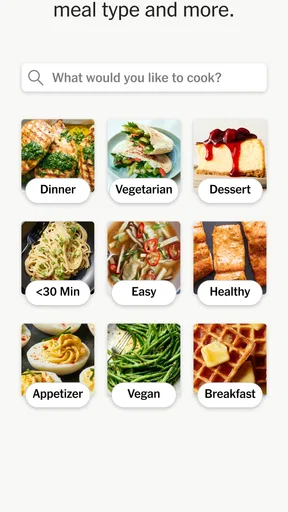
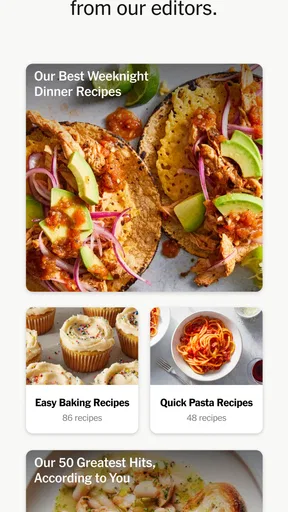
First off, the interface is super user-friendly. You open the app, and bam! You’re greeted with a clean, intuitive layout. Everything is neatly categorized, so you can easily find what you’re craving. Whether you’re in the mood for something exotic or just want a comforting bowl of pasta, this app has your back.
And let’s not forget the search functionality. You can search by ingredient, dietary preference, or even by the time you have available. Seriously, if you only have 20 minutes to spare, there’s a delicious recipe waiting just for you.
Features That Make Life Easier
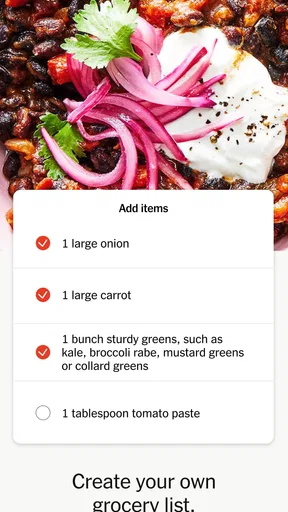
One feature I absolutely love is the shopping list integration. You find a recipe you want to try, and with just a tap, all the ingredients are added to your shopping list. It’s a lifesaver when you’re at the grocery store trying to remember if you need to buy cilantro or parsley.
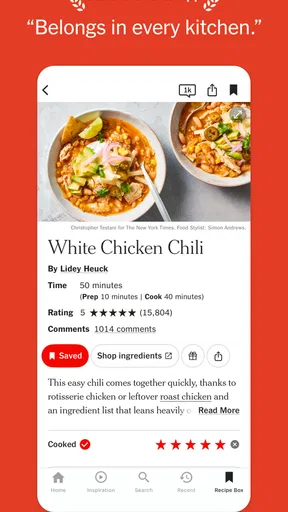
Plus, the app provides step-by-step instructions that are easy to follow. Each recipe comes with beautiful photos and sometimes even a video tutorial. It’s like having a chef walk you through every step of the way.
Community and Personalization
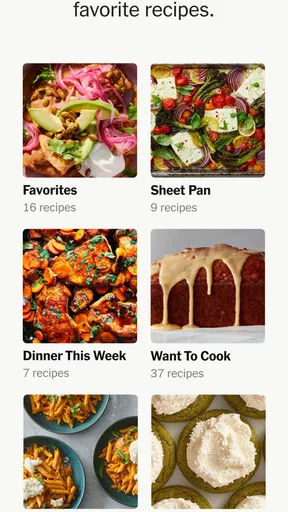
This app isn’t just about recipes; it’s a community. You can save your favorite recipes, rate them, and even leave comments. It’s always fun to see how others tweak recipes to make them their own. And if you’re someone who likes to plan ahead, the app lets you organize your meals for the week.
Worth Reading Before You Choose

EA SPORTS FC Mobile 26 Is a Bigger Football Game, but It Takes Time

Flipboard Shows What News Apps Must Do Beyond the Feed

Switching to Android Auto Means Rethinking Your Driving Routine

Google Calendar Makes a Crowded Week Easier to Manage

Ludo King Makes the Most of the Minutes Between Plans

Baby Panda World Brings Quick Play to Modern Phones, but Its Game Library Feels Busy
One of the coolest things? The app learns your preferences. Over time, it starts suggesting recipes based on what you’ve liked in the past. It’s like it knows me better than I know myself!
Reading and finding a recipe
In practice, I find the quickest route is to search with what I already have, then narrow the choice by the time I can spare. That is more useful than browsing a long list while hungry and short on patience. A recipe title may sound promising, but I still check the ingredient list and directions before committing: a short cooking time does not necessarily mean little preparation, and an unfamiliar ingredient can turn a supposedly easy dinner into an extra shop.
The app is free to install, and its Food & Drink focus is clear: it is built around cooking rather than restaurant discovery or grocery delivery. The New York Times Company develops it, and the current version is 2.124.0. It has a 4.6 average from around 15,000 ratings and over 500,000 installs. Those figures suggest a well-used recipe app, though they do not tell me whether a particular dish will suit my kitchen or tastes.
Using it at the counter and in the shop
A practical routine is to save a few recipes while planning, add ingredients for the chosen meals to the shopping list, and check that list before leaving home. At the shop, I would treat it as a prompt rather than a finished inventory: check what is already in the pantry, and confirm quantities against the recipe. That small pause can prevent buying duplicate staples or assuming an ingredient is optional when it is not.
During cooking, step-by-step directions are helpful when I am juggling several tasks. I prefer to read the whole recipe once before starting, then keep the current step in view; it is easier to spot a long resting or prep stage before the pan is hot. Photos can help clarify what a finished dish should look like, while a video, when available, may be more useful for a technique that is hard to picture from text alone. Not every recipe has video, so I would not rely on that format for every meal.
Comfort, pace and different situations
Clear recipe organization can make the app approachable for someone still learning to cook, but a phone is not always the easiest place to follow instructions. Small on-screen text, glare, wet hands and a device that keeps dimming can all interrupt cooking. I would enlarge text through the phone’s own display settings if needed, place the device somewhere safe from spills, and avoid trying to scroll with messy fingers. The app’s written directions are useful, but they do not remove the practical challenge of reading while handling hot pans or raw ingredients.
It can also suit a shared household: one person can choose recipes, another can check the shopping list, and saved dishes give everyone a common starting point for planning. For a solo cook, saving reliable meals reduces the effort of deciding what to make after work. For a family, the collection offers ideas beyond the familiar rotation, but I would still review ingredients and serving needs before choosing. The app’s recommendations may reflect what I have liked before, which is convenient, yet they can also keep me circling similar dishes when I want a deliberate change.
When another approach may work better
Compared with a general web search, a dedicated recipe collection can feel more orderly: the instructions and related planning tools sit together instead of being scattered across pages. Compared with a basic notes app, it offers a cooking-focused way to find, save and revisit recipes. But if I only need one specific recipe, a quick web search may be faster; if I want a strict meal plan with detailed nutrition tracking or a highly customized grocery workflow, I would look for a tool designed specifically for that job rather than assume this one covers it.
There is also a cost distinction worth noticing. The app is free to download, while in-app purchases range from $4.99 to $299.99 per item. I would check what is included before paying and decide whether I use the recipes often enough to justify any purchase. It is marked for Everyone, but that age label does not mean every recipe fits every dietary need: people managing allergies or strict restrictions should inspect each ingredient and make substitutions only when they understand how those changes affect the result.
Who will get the most from it?
I think it is a strong fit for cooks who want dependable inspiration, enjoy trying recipes, and are willing to do a little planning before shopping. Beginners can benefit from ordered instructions, while experienced cooks may appreciate having a collection to browse and save from. It is less compelling for someone who rarely cooks, already has a personal system that works, or expects the app to automatically solve every dietary, budget or accessibility need. My best tip is to save only recipes I would genuinely make, then use those saved choices to build a realistic shopping list instead of collecting more ideas than I can cook.
Final Thoughts
Honestly, I can’t recommend the app enough. It’s transformed my cooking routine and made meal planning a breeze. Whether you’re cooking for one or feeding a family, it has something for everyone.
So, if you’re tired of the same old meals and want to spice things up in the kitchen, give it a try. Just remember to check the ingredients, timing and any purchase options against your own needs. Who knows, you might just discover your new favorite dish!
Pros
- Extensive recipe database available.
- User-friendly interface for easy navigation.
- Personalized meal recommendations.
- Offline access to saved recipes.
- Frequent updates with new recipes.
Cons
- Requires a subscription for full access.
- Limited free content available.
- No grocery list feature integrated.
- Occasional app crashes reported.
- Some recipes lack detailed instructions.
FAQs for NYT Cooking: Quick Tasty Meals
What is NYT Cooking: Quick Tasty Meals?
NYT Cooking: Quick Tasty Meals is an app designed to help users discover and prepare delicious recipes curated by The New York Times. The app offers a wide range of recipes, from quick dinners to elaborate feasts, along with step-by-step instructions, nutritional information, and tips from professional chefs.
Is NYT Cooking: Quick Tasty Meals free to use?
While NYT Cooking offers some free content, access to the full range of recipes and features typically requires a subscription. Users can explore a limited number of recipes without charge, but a subscription unlocks the complete library, personalized recommendations, and exclusive content.
What platforms is NYT Cooking available on?
NYT Cooking: Quick Tasty Meals is available on both Android and iOS platforms. Users can download the app from the Google Play Store for Android devices and from the Apple App Store for iOS devices. The app is designed to provide a seamless experience across smartphones and tablets.
Can I save and organize my favorite recipes in the app?
Yes, NYT Cooking allows users to save and organize their favorite recipes. The app provides features to create personalized recipe collections, bookmark favorite dishes, and even add personal notes to recipes. This makes it easy to plan meals and revisit beloved recipes anytime.
Do I need an internet connection to use the app?
An internet connection is required to access and browse new recipes on NYT Cooking. However, users can save recipes for offline viewing, allowing them to access their favorites even without a connection. This feature is particularly useful for cooking in areas with limited connectivity.


